Home / Jobs / Plumbers and heating engineers
Jobs for plumbers
Concrete scanning for plumbers
Riser and waste cores, trenches for new drains, fixings over underfloor heating. The thing you must not hit is often plastic, and sometimes it is your own pipe.
Before you core or cut a floor
Stop and call the engineer if
- the slab is post-tensioned
- the concrete sits on a metal deck, which radar in general cannot see through
The short version of this page. The details and sources follow below.
From Concrete scanning for plumbers: drillclear.com/jobs/plumbers, where every step has its sources.
- US
- floor core, riser, radiant tubing, slab on grade, sleeve
- UK
- UFH pipes, screed, soil stack, waste, core through the slab
The jobs
01A core for a riser
Scan a grid around the drawn position, mark every bar and conduit, then find a clear spot for the core with room to spare.
02A trench on grade
A full-depth cut reaches whatever lies near the bottom of the slab in its path.
03Underfloor heating
PEX loops usually sit in the screed above the insulation, and sometimes in the slab itself. Find every run before you fix anything to the floor.
Try the job in 3D
Scan two lines along and two across: the lab marks every crossing. Then pick a core size and drag the circle: red on a mark, green when clear by 30 mm in this model, amber outside your lines.
One situation from the Scan lab, which has all eleven.
How pros do it
- Scan more than the hole. Scan each core or anchor location in two directions, over enough area to move the hole if it lands on a tendon1.
- A moved hole is a new hole. A scan of the old spot does not automatically clear the new one2: scan again.
- Make heating pipes easy to see. A radar specialist advises filling radiant tubes with liquid, or turning the system on3. On a UK self-build forum, people suggest a thermal camera, or running the heating and watching a freshly mopped floor dry over the pipes4.
- Read the loops. Heating tubes show lots of curves and bends, especially near the walls3.
- Mark and keep clear. Mark a confirmed point with an X or a circle, and PT or live utilities in another colour, often red5. One scanning firm keeps a 3-inch buffer from every tendon1.
From the trade sources listed below, opened 16 November 2026. They describe professional practice in general, mostly with GPR, not Eagle XR.
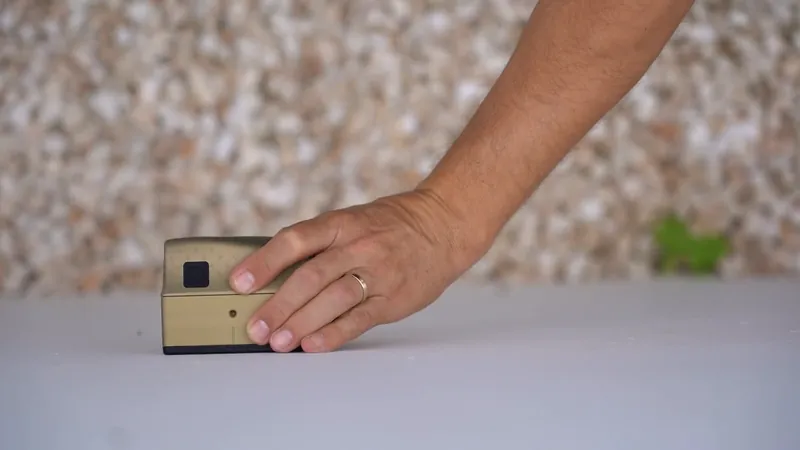
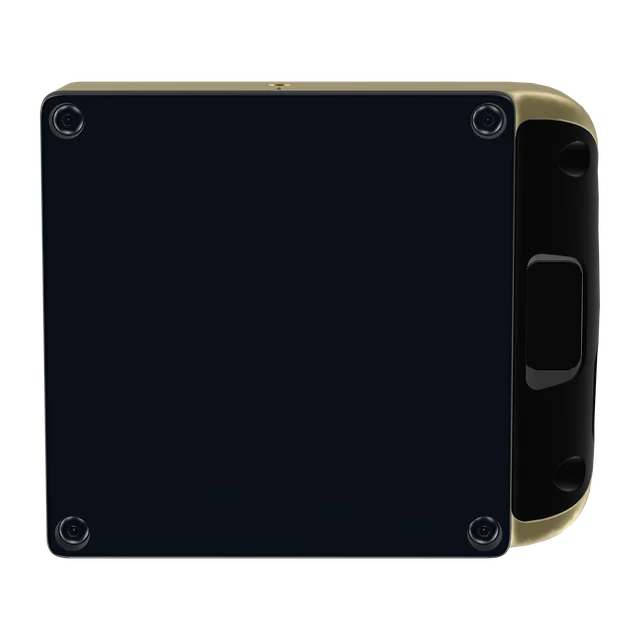
This side goes flat on the surface.
Where Eagle XR fits
- It lists water pipes, even non-metallic PEX and PVC, plus conduits, rebar and PT ducts6.
- Slabs, walls and columns7: one sweep across a wall, ceiling or floor8.
- A stated depth of up to 40 cm (16 in) in concrete7, and the back of the element shows where the slab ends.
- It scans one line at a time, in one direction: slide it forward along the line, lift it, start the next.
Where it does not
- Screed build-ups with insulation, and tiles, are not addressed in Screening Eagle's published facts. It names concrete (dry, normal or wet), drywall and masonry (brick and block) on the App Store listing6, while the product page says Eagle Intelligence is trained on concrete and learning more materials7.
- Concrete on a metal deck: not published for Eagle XR, and radar in general cannot see through a continuous metal layer at the top or bottom of the concrete9.
- On a post-tensioned slab, the engineer decides. Not a GPR: a first look for everyday work, to see whether a spot is clear or whether to call an expert; for investigations, mapping and reports, Screening Eagle points professionals to GPR systems7.
Questions plumbers ask
Will it find PEX underfloor heating in screed?App Store listing, product page, not published
PEX pipes are listed, but screed over insulation is not addressed. Our Floor situation shows the idea in our own model, not as a promise. Make the loops easy to see (see How pros do it), and ask Screening Eagle if your floors are mainly screed.
Will it find an empty plastic pipe?Not published
Not published for Eagle XR. Bosch writes of its own scanner that "Empty plastic pipes are not displayed" in its heating mode10. Ask Screening Eagle before you order if it decides the job for you.
How big an area should I scan for a 110 mm core?General
There is no single rule: scan the hole plus the clearance the work needs, with room to move it. Professionals scan the actual penetration area and its clearance2. Your engineer or the site rules set the real margin, not our lab's 30 mm.
Can I scan a slab on grade before cutting a trench?Press release, product page
Yes, usually from the one face you can reach, within the stated depth. What lies in the ground under the slab is not addressed in Screening Eagle's published facts.
Will it show a copper pipe?Not published
Not published. Screening Eagle names water pipes including PEX and PVC6, but not how the app shows or labels copper.
Can it tell me how thick the slab is, for the bit length?Product page, general
It shows where the slab ends, but how accurate that is has not been published. Hilti works out the bit length from the measured slab or wall thickness11.
Anything else: search every answer on this site on Before you buy, or ask Screening Eagle directly.
Ready for your own job?
CHF 3,950per scanner, excluding VAT, import taxes and delivery. Ordering happens on Screening Eagle's shop.
Buy in Solar GoldPartner link: we may earn a commission. You pay Screening Eagle's normal price.
- Sold and shipped by Screening Eagle
- Same price in all four finishes
- Card, Apple Pay or Google Pay
- Express shipping from Switzerland. US orders ship from Pennsylvania
Sources
- Trinity Subsurface, Scanning Post-Tension Slabs Before You Core or Cut, read 16 November 2026, trinitysubsurface.com
- Associated Builders and Contractors, Central Texas chapter, GPR Concrete Scanning Before the Core Drill Starts, read 16 November 2026, abccentraltexas.org
- Sensors & Software, TIPS: Locating radiant heating tubes, read 16 November 2026, sensoft.ca
- BuildHub forum, Finding UFH pipes in screed, read 16 November 2026, forum.buildhub.org.uk
- Penhall, Slab Scanning 101: When You Need It and What it Includes, read 16 November 2026, penhall.com
- Apple App Store, Eagle XR listing by Screening Eagle Technologies AG, read 15 November 2026, apps.apple.com
- Screening Eagle, Eagle XR product page and FAQ, read 15 November 2026, xr.screeningeagle.com
- Screening Eagle, Eagle XR launch press release, 17 September 2026, screeningeagle.com
- SPH Engineering, GPR Scanning in Concrete to Find Rebar, PT Cables and Voids, read 16 November 2026, sphengineering.com
- Bosch, Wallscanner D-tect 200 C Professional, original instructions (2021), read 16 November 2026, homelectrical.com
- Hilti New Zealand, Typical Applications for Detection Systems, read 16 November 2026, hilti.co.nz