Jobs for electricians
Concrete scanning for electricians
Moving a box in a concrete wall, coring for a conduit riser, fixing containment or strut to a soffit. Somebody else's conduit, a bar or a PT tendon may sit exactly where your hole goes.
Before you drill for a box or core
Stop and call the engineer or a scanning specialist if
- the slab is post-tensioned
- the job needs a survey or a report
The short version of this page. The details and sources follow below.
From Concrete scanning for electricians: drillclear.com/jobs/electricians, where every step has its sources.
- US
- x-ray the slab, conduit, j-box, unistrut, core
- UK
- back box, chasing, containment, cable tray, soffit
The jobs
01Moving a socket in a concrete wall
Conduits in cast walls run where they were placed, diagonals included. Scan lines each way around the new box before you drill a fixing.
02A core for a conduit riser
Through an elevated slab, scan an area bigger than the bit.
03Containment on a soffit
Strut and tray hangers go up into the underside of the slab. Overhead, the depth of a tendon matters as much as its position.
Try the job in 3D
A conduit runs down to the socket and a second one leaves it at an angle. Scan one line, look through the concrete, then rotate 90 degrees.
One situation from the Scan lab, which has all eleven.
How pros do it
- Treat every cable as live. Isolate and prove dead before you drill near one. Hilti's warning about a live conduit: "you can get an electric shock and severely hurt yourself or even be killed"1.
- Scan two ways over the spot. ABC Central Texas calls it best practice to scan each planned hole in two directions at right angles2.
- Mark what you found. Mark a clear point with an X or a circle, and PT cables or live utilities in another colour, often red3.
- Hand the hard ones to a specialist. On Mike Holt's forum, one electrician hired a company to x-ray the slab4; another says the job needs the kind of x-ray contractor used to find post-tension cables5.
From the trade sources listed below, opened 16 November 2026. They describe professional practice in general, mostly with GPR, not Eagle XR.
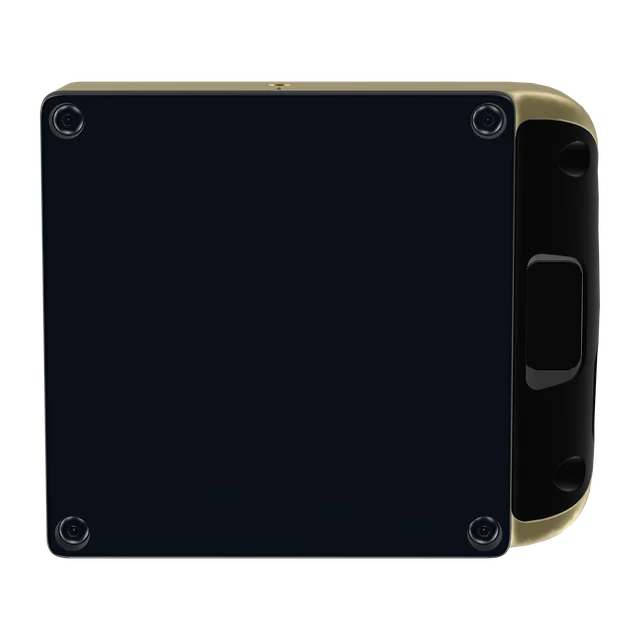
This side goes flat on the surface.
Where Eagle XR fits
- It lists electric cables and conduits, plus rebar, PT ducts and plastic water pipes, each in colour at its depth6.
- Walls, slabs, columns and corners7.
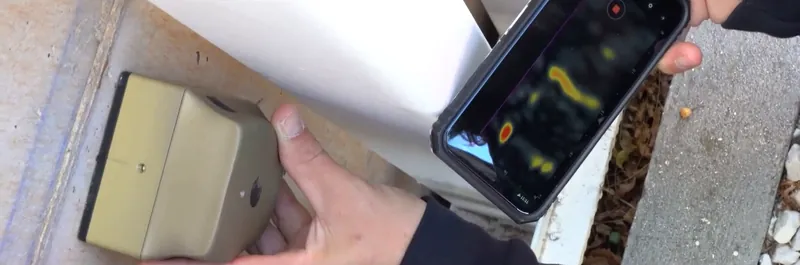
- It scans one line at a time, in one direction: slide it forward along the line, lift it, start the next.
- Scans are saved, synced and shareable7, and you can screenshot one, mark it up and send it to the team6.
Where it does not
- Not a GPR: a first look for everyday work, to see whether a spot is clear or whether to call an expert; for investigations, mapping and reports, Screening Eagle points professionals to GPR systems7.
- On a post-tensioned slab, the engineer decides, whatever any scanner shows; surveys and anything that needs a report stay with the specialist.
Questions electricians ask
Will it tell me whether a cable is live?Not published
Not published, so follow the first step under How pros do it. Some radar scanners do sense live wires: Hilti lists them among what its PS 1000 finds8.
Will it find a plastic conduit?App Store listing, not published
Conduits are listed, but whether an empty plastic conduit shows has not been published. Bosch writes of its own wall scanner that "Empty plastic pipes are not displayed" in one mode9. Ask Screening Eagle before you order if it decides the job for you.
Can it tell a conduit from a bar?Product page, not published
It shows each object in colour at its depth, but whether it labels an object as a conduit or a bar has not been published. The product page's own illustration labels REBAR, CABLE and PLASTIC PIPE7. Treat any object you cannot place as live.
Does it work in a block or brick wall?App Store listing, product page
Masonry is listed, but Screening Eagle says its intelligence is trained on concrete and still learning more materials. The App Store listing names concrete (dry, normal or wet), drywall and masonry (brick and block)6; the training note is on the product page7.
Does it replace the x-ray or scanning contractor?Product page
No. Screening Eagle calls Eagle XR a first look for every crew, so the experts can focus on the high-value jobs7.
How long does a scan take?Not published, general
Screening Eagle has not published a time. A scanning contractor quotes 5 to 15 minutes to scan, interpret and mark one planned core or anchor location3.
Can I send the picture to the GC or the engineer?Product page, App Store listing
Yes, as a marked-up screenshot; no formal report format is published.
Anything else: search every answer on this site on Before you buy, or ask Screening Eagle directly.
Ready for your own job?
CHF 3,950per scanner, excluding VAT, import taxes and delivery. Ordering happens on Screening Eagle's shop.
Buy in Solar GoldPartner link: we may earn a commission. You pay Screening Eagle's normal price.
- Sold and shipped by Screening Eagle
- Same price in all four finishes
- Card, Apple Pay or Google Pay
- Express shipping from Switzerland. US orders ship from Pennsylvania
Sources
- Hilti New Zealand, Typical Applications for Detection Systems, read 16 November 2026, hilti.co.nz
- Associated Builders and Contractors, Central Texas chapter, GPR Concrete Scanning Before the Core Drill Starts, read 16 November 2026, abccentraltexas.org
- Penhall, Slab Scanning 101: When You Need It and What it Includes, read 16 November 2026, penhall.com
- Mike Holt's Forum, thread "XRAY Concrete slabs", read 16 November 2026, forums.mikeholt.com
- Mike Holt's Forum, thread "Are there conduits in that concrete?", read 16 November 2026, forums.mikeholt.com
- Apple App Store, Eagle XR listing by Screening Eagle Technologies AG, read 15 November 2026, apps.apple.com
- Screening Eagle, Eagle XR product page and FAQ, read 15 November 2026, xr.screeningeagle.com
- Hilti New Zealand, How to choose the right detection tool, read 16 November 2026, hilti.co.nz
- Bosch, Wallscanner D-tect 200 C Professional, original instructions (2021), read 16 November 2026, homelectrical.com