How to use Eagle XR: from unboxing to the first hole
Screening Eagle's own instructions are three short steps. The rest of a safe hole is ordinary site practice: a second line at 90 degrees, marks on the wall, and knowing when to stop and ask.
Before you scan with Eagle XR and drill
Stop and call an expert if
- the slab or beam is, or might be, post-tensioned
- the hole will not fit between the marks, or the picture shows something you cannot explain
- you are coring or cutting a structural element
- the client or the site asks for a documented survey or a report
The short version of this page. The details and sources follow below.
From How to use Eagle XR: from unboxing to the first hole: drillclear.com/guides/how-to-use-eagle-xr, where every step has its sources.
Before it arrives: check your phone
Check that your phone can run the app before you order, not after. Your phone is the screen, and the app needs an Eagle XR scanner to work2.
| Check | What is published |
|---|---|
| iPhone | iOS 18.2 or later. The app is free and 51 MB2. |
| Android | An Eagle XR app is listed on Google Play3. Open the listing on the phone you plan to use. |
| Huawei | The AppGallery version is for China only1. |
| App languages | English, German, Japanese, Simplified Chinese, Spanish2 |
| Scanner | 750 g sensor weight, 100 x 90 mm ("fits in tight corners")1 |
The shop's 14-day return policy excludes products "that have been used, activated or registered (e.g. app software)"4.
The three official steps
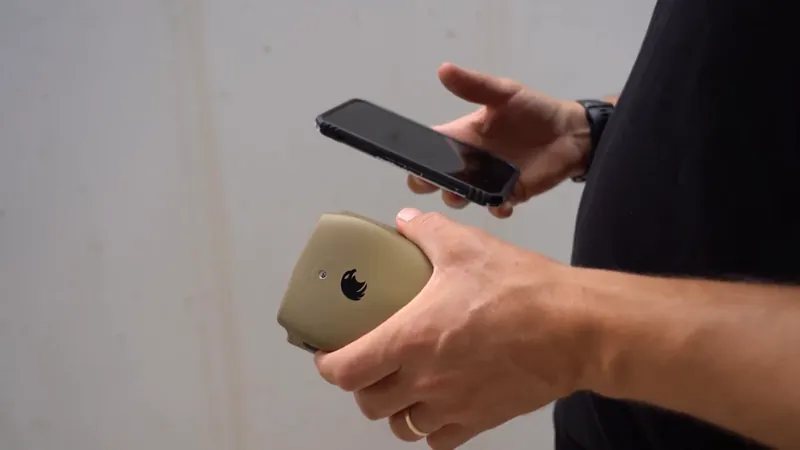
Screening Eagle gives three steps: connect, scan, see. Scan the QR code on the scanner to connect it to the app, scan the surface (walls, slabs, columns or corners), and see every object in colour at its depth1.
That is all the instruction on the pages we read. The scanner pairs with the phone you already carry, and scans are saved, synced and shareable1.
One line at a time, in one direction
A scan is one line, and you slide the scanner forward along it. It does not scan backwards or sideways. This is our own observation with a unit on 15 November 2026, not a published specification.
The product page's demo, labelled "Illustration", shows the result as a virtual slice under the surface, with a depth axis from 0 to 40 cm and objects labelled rebar, cable, plastic pipe and back wall1. See how to read a concrete scan.
Why you scan a second line at 90 degrees
A line scan mostly shows what crosses the line, so something running along it can be missed. GSSI's concrete radar handbook says that in the standard setup an antenna mostly detects metal objects lying roughly perpendicular to the survey line5. That is about radar scanning in general, not a published Eagle XR specification.
From scan to hole
Mark the spot, scan across it and at 90 degrees, join the ticks, and drill only in a clear field. This is general site practice; your site rules come first.
- Look and isolate first. The UK Health and Safety Executive's advice is to know where concealed power cables and gas pipes are before drilling, and to turn services off if you do not6. Look on both sides of the wall7.
- Mark the hole and scan a line across the mark that starts well before it and ends well after it. Tick the surface at every object the app shows.
- Scan a second, parallel line about a hand's width away and tick again. Join the ticks: that is your best estimate of where the bar, cable or pipe runs.
- Turn 90 degrees and repeat.
- Hatch a no-drill band along every joined line, wide enough for the object plus your safety margin on each side.
- Put the hole in a clear field. The whole bit or core diameter has to fit between the bands. If it does not, move the hole.
- Drill, and stop at the first sign of steel or of anything you did not expect. See what to do if you hit rebar while drilling.
Screenshot it and send it
Send a marked-up screenshot to whoever drills next. The App Store listing describes marking up a screenshot on your phone and sending it to the team2. Add a photo of the marked wall with a tape measure in the frame, so the marks can be found again after painting.
When to stop and call an expert
Stop when the scan cannot clear the hole, or the job needs more than a first look. Screening Eagle's FAQ calls Eagle XR "a first look for everyday work", not a GPR: for investigations, mapping and reports it points to GPR systems such as Proceq's, and it says Eagle XR does not replace an expert1.
The App Store listing names PT ducts among the things the scanner shows2, but a picture is not clearance: read drilling into a post-tensioned slab. A structural core or cut needs the engineer's sign-off whatever the scan shows.
What Screening Eagle has not published. As of 15 November 2026 we could not find any of these on its pages:
- Battery type and runtime, and how the scanner charges
- How the scanner connects to the phone (Bluetooth, Wi-Fi or cable)
- What is in the box
- Warranty length
- Accuracy of the depth shown
- The minimum Android version, and a list of supported phone models
If one of these decides it for you, ask Screening Eagle before you order.
Limits
Treat every depth as an estimate, and every spot you did not scan as unseen.
- The 40 cm figure is stated for concrete1. Radar-type scanners in general see less far in wet or young concrete and under dense steel5.
- GSSI warns that even a GPR working with an assumed concrete type can be off by as much as 20% in depth5.
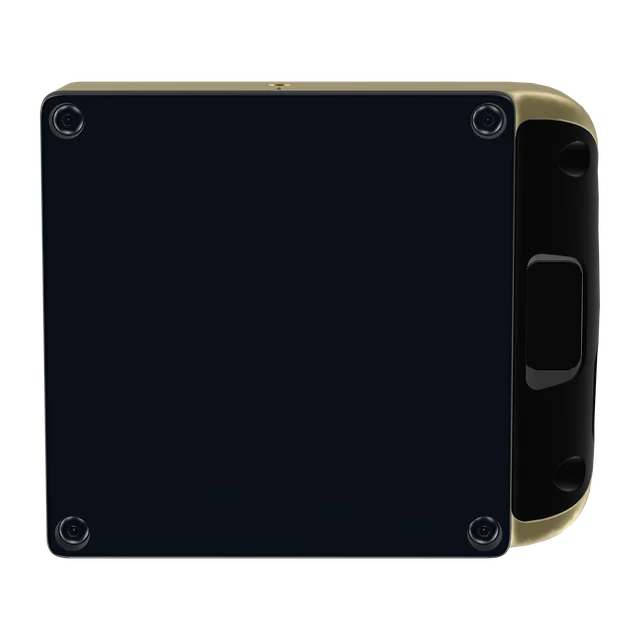
This side goes flat on the surface.
Want to see inside before the next hole?
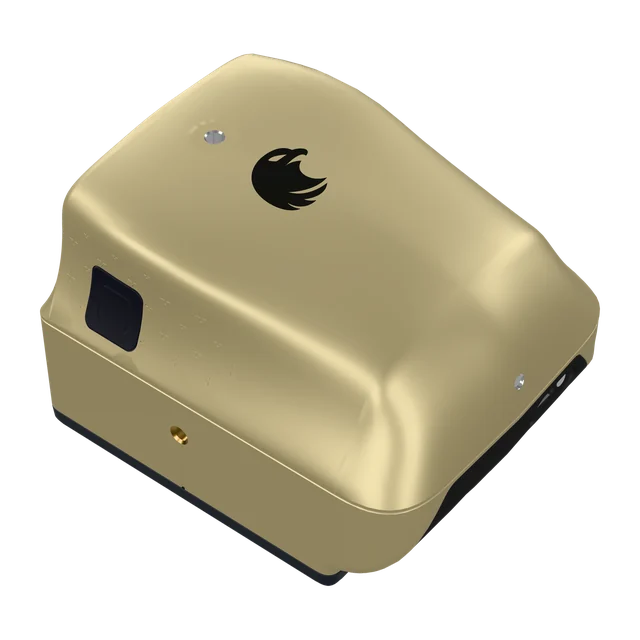
Eagle XR is a pocket concrete scanner that pairs with your phone and shows rebar, cables, plastic pipes and air voids at their depth. Stated depth in concrete: up to 40 cm. CHF 3,950 excluding VAT, import taxes and delivery.
Buy in Solar GoldPartner link: we may earn a commission. You pay Screening Eagle's normal price.
- Sold and shipped by Screening Eagle
- Same price in all four finishes
- Card, Apple Pay or Google Pay
- Express shipping from Switzerland. US orders ship from Pennsylvania
Sources
- Screening Eagle, Eagle XR product page and FAQ, read 15 November 2026, xr.screeningeagle.com
- Apple App Store, Eagle XR listing by Screening Eagle Technologies AG, read 15 November 2026, apps.apple.com
- Google Play, Eagle XR listing (com.proceq.xr), read 15 November 2026, play.google.com
- Screening Eagle, official Eagle XR shop and return policy, read 14 November 2026, store.screeningeagle.com
- GSSI, Concrete Handbook MN72-367 Rev H, atecorp.com
- UK Health and Safety Executive, CIS65 Avoiding concealed services and overhead power lines, www.hse.gov.uk
- UK Health and Safety Executive, Work near electricity, www.hse.gov.uk